

Adblock Plus - free ad blocker
Music & AudioFreemium
Remove ads on YouTube and everywhere else you browse.
4.4188,000 reviews37M+
View Extension
Changes the color temperature of websites.
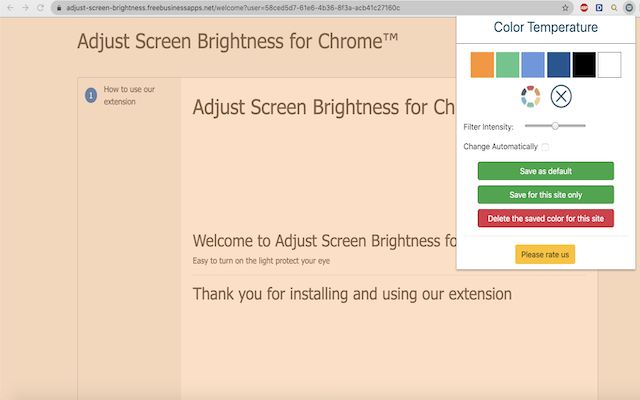
This extension helps to reduces the screen brightness level for both daytime and nighttime periods to reduce eye strain when using the computer. It is designed to reduce eyestrain while reading documents online. To enhance the usability the extension offers two different values for daytime and nighttime duration. Note: It is possible to have no effect on daytime duration by setting the brightness level to 100% . Blue Light - Take care of your eyes by eliminating the blue light coming from your screen. Highly recommended especially during late night browsing. Simply slide to the preferred level of warmth. Blue light affects the quality of your sleep. Hence it is recommended for users to stop using their phones/computers at least two hours before they go to sleep. Brightness / Saturation / Contrast - Adjust the brightness, the contrast and the saturation to match the recommended healthy levels and protect your eyes.
Adjust Screen Brightness for Browser is free. There is no paid tier to consider.
Remove ads on YouTube and everywhere else you browse.

Do more in Google Chrome with Adobe Acrobat PDF tools. View, fill, comment, sign, and try convert and compress tools.

LastPass is an award-winning password manager for secure credential management on any device.

Avira Password Manager saves, manages, and syncs all your passwords across all your devices.

Schedule Zoom meetings directly from Google Calendar

Tampermonkey lets you install and run userscripts to customize websites, automate repetitive tasks and enhance functionality.
Yes, Adjust Screen Brightness for Browser is free to use.
Adjust Screen Brightness for Browser is published by https://adjust-screen-brightness.freebusinessapps.net/. As with any extension, review the permissions it requests before installing and remove it if you stop using it.
Browse the Music & Audio category for comparable options.
Picked from the Music & Audio category and the tags adjust, screen, brightness — jump straight to the alternatives and head-to-head pages people open next.
Side-by-side feature tables, pricing and a clear recommendation.