

Adobe Acrobat: PDF edit, convert, sign tools
Music & AudioFreemium
Do more in Google Chrome with Adobe Acrobat PDF tools. View, fill, comment, sign, and try convert and compress tools.
4.462,900 reviews311M+
View Extension
Displays country flag of website's server location, Whois and Geo info
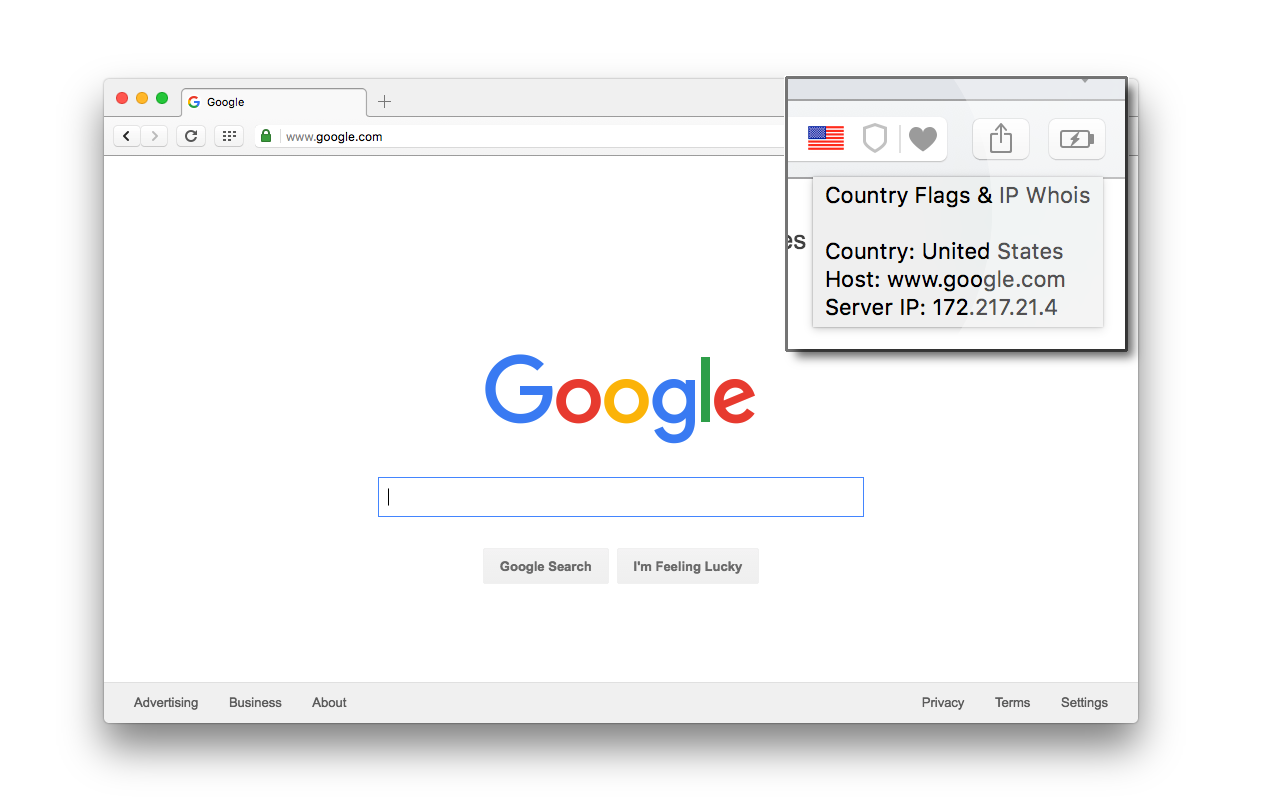
A browser extension to display the page's server flag in the toolbar area indicating the current webserver's physical location. This is done by comparing the IP range with an offline database from MaxMind's GeoLite (there is no server interaction to get the info). Knowing the server location adds an extra layer of awareness to your browsing and is useful to indicate the native languages and legal jurisdictions that may apply. Additional information about Geolocation or Whois info can be obtained via the left- and right-click on the action icon. Features: 1. This is an open-source project (https://github.com/andy-portmen/country-flags/issues) 2. Identifies IP4, IP6, and private IP addresses 3. It is now possible to use the native DNS resolver if a user is under a SOCKS proxy (disabled by default; requires native integration) 4. Offline database updates once per 7 days using the window.caches API 5. Supports running a custom command when an IP is resolved; This command accepts [ip], [host], [curl], [enurl] and [url] keywords 6. Open requested service optionally in the background and/or adjacent to the current tab. Available tools in the right-click menu (only six services are visible in the main menu): 1. SSL Checker: Check SSL certificate 2. Traceroute: Display the route and transit delays of packets 3. Ping: Test the reachability of this IP address 4. TinyURL: Shorten the URL using TinyURL.com 5. DNS Lookup: Perform an authoritative DNS lookup 6. Whois Lookup: Find the registration and delegation of a domain name 7. HTTP Headers: List all the response HTTP headers 8. Copy IP: Copy IP address to the clipboard 9. Alexa: Website traffic, statistics, and analytics 10. WOT Scorecard: Website reputation ratings 11. Virustotal: A free virus, malware, and URL scanning service 12. Check Server Status: Helps find whether a website is down or not 13. Google Translate: Free service instantly translates words, phrases, and web pages 14. Google Cache: Google cached pages for any website 15. Wikipedia: Domain search 16. intoDNS: Checks the health and configuration of DNS and mail servers 17. Netcraft: Provides internet security services including anti-fraud and anti-phishing services 18. Wave Report: Provides web accessibility solutions 19. Validate.nu: HTML5 Validator 20. W3C CSS Validator: CSS Validator 21. W3C Validator: HTML5 Validator 22. Internet Archive: Free universal access to archived web pages 23. Google: Search by domain 24. Wolfram|Alpha: Access to the world's facts and data -- Permissions: For a comprehensive description of why these permissions are needed check https://add0n.com/country-flags.html#permissions
Country Flags & IP Whois is free. There is no paid tier to consider.
Do more in Google Chrome with Adobe Acrobat PDF tools. View, fill, comment, sign, and try convert and compress tools.

Your surfing made private and secure

Browsec VPN is a Chrome VPN extension that protects your IP from Internet threats and lets you browse privately for free.

VeePN is a VPN extension that unblocks websites and secures your connection with encrypted tunneling and unlimited bandwidth.

Avira Password Manager saves, manages, and syncs all your passwords across all your devices.

Chrome Remote Desktop extension
Yes, Country Flags & IP Whois is free to use.
Country Flags & IP Whois is published by Country Flags & IP Whois. As with any extension, review the permissions it requests before installing and remove it if you stop using it.
Browse the Music & Audio category for comparable options.
Picked from the Music & Audio category and the tags country, flags, whois — jump straight to the alternatives and head-to-head pages people open next.
Side-by-side feature tables, pricing and a clear recommendation.