

Chrome Remote Desktop
Music & AudioFree
Chrome Remote Desktop extension
3.12,900 reviews37M+
View Extension
Easily view PDF and MS Office documents in your browser.
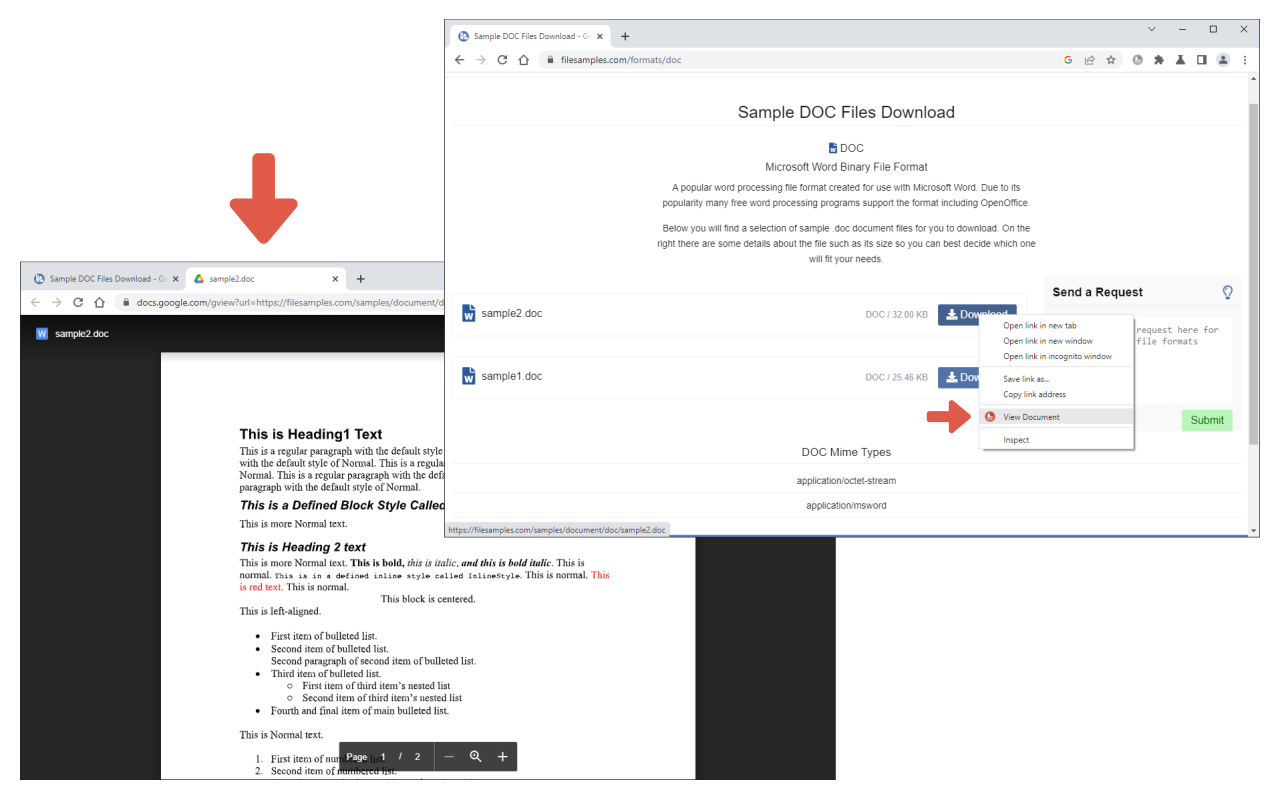
Docs Viewer is an extension that let you open and view a wide range of online documents right in your browser (new tab). Simply add the add-on to your browser and start surfing. Once you see a document link (i.e. .doc, .docx, .ppt, .pdf), please right-click on the link and then select - View Document - from context menu. The document will be rendered and opened in a new tab. You can also, print the document to PDF or send it to a printer right away (via the print button within the page). Please note that this add-on uses the google gview engine to render the document. Moreover, it supports a wide range of documents, including pdf, doc, docx, ppt, and more. If you have a feature request or found a bug to report, please fill out the bug report form on the add-on's homepage (https://mybrowseraddon.com/docs-viewer.html).
Docs Viewer is free. There is no paid tier to consider.
Chrome Remote Desktop extension

Generates a dark theme for every website.

Browsec VPN is a Chrome VPN extension that protects your IP from Internet threats and lets you browse privately for free.

Found a webpage, image, or quote that you want to save for later? With the Google Keep Chrome Extension, easily save the things yo.

The simplest and most reliable volume booster 🚀 Features ⭐️ Up to 600 % volume boost ⭐️ Control volume of any tab ⭐️ Voice boost -.

Avira Password Manager saves, manages, and syncs all your passwords across all your devices.
Yes, Docs Viewer is free to use.
Docs Viewer is published by Docs Viewer. As with any extension, review the permissions it requests before installing and remove it if you stop using it.
Browse the Music & Audio category for comparable options.
Picked from the Music & Audio category and the tags docs, viewer — jump straight to the alternatives and head-to-head pages people open next.
Side-by-side feature tables, pricing and a clear recommendation.