

Adobe Acrobat: PDF edit, convert, sign tools
ProductivityFreemium
Do more in Google Chrome with Adobe Acrobat PDF tools. View, fill, comment, sign, and try convert and compress tools.
4.462,900 reviews311M+
View Extension
The legrooms extension helps you find the best flight with optimal legroom and the cheapest price.
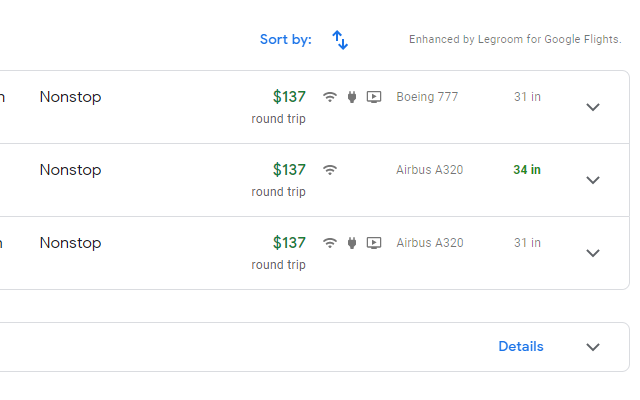
Legrooms for Google Flights displays legrooms, carry-on restrictions and amenities as well as missing prices alongside Google Flight search results for easy comparison. With our flight comparison feature, you can convert your exact route on Google Flights to Kayak, Skyscanner and other popular flight providers. With just one click, you can compare flight fares without wasting time inputting your search on different sites When browsing for flights, we get a listing by cost, schedule and duration. For travelers who value comfort, comparing seat legroom takes more work. Google Flight has the information available after you selected a segment in the itinerary. Why not have the information on the search result too? With this extension, legroom and carry-on information will be shown on the search result! It is time to show the airlines that we care about our comfort too. We also display deals from different hotels and airlines in the popup panel and on any travel sites while booking your next vacation. You can also earn Legroom Miles back as gift cards for your favorite airlines and hotel brands for purchases you make online at your favorite stores! When you use Legrooms browser extension, we may get paid a cut of the order value on hotel stays and products. By installing the Legrooms browser extension, you agree to the Legrooms Terms & Conditions at https://www.flightlegroom.com/terms Update 2.0.0 Legrooms V2 adds price comparisons so you can find cheaper fares and legroom miles so you can earn airline gift cards while shopping online at partner stores. Update 1.9.7 Fix layout to conform to changes on Google Flights website. Update 1.9.6 Update extension to work with a new version of Google Flight that load first flight information with the page. Update 1.9.5 Add support for dark mode. Update 1.9.4 Update extension to work with new changes to Google Flights site. Update 1.9.3 Update extension to work with new Google Flights URLs. Please see our Privacy Policy at https://www.flightlegroom.com/privacy-policy
Legrooms+ for Google Flights is free. There is no paid tier to consider.
Do more in Google Chrome with Adobe Acrobat PDF tools. View, fill, comment, sign, and try convert and compress tools.

Chrome Remote Desktop extension

✓ Permissions: like common ad-blocking extensions we do need default permissions on every website to remove ads or popups for exam.

Used by 15M+ people. An easy-to-use screen recorder for your browser. Capture, edit and share videos in seconds.

The simplest and most reliable volume booster 🚀 Features ⭐️ Up to 600 % volume boost ⭐️ Control volume of any tab ⭐️ Voice boost -.

Tampermonkey lets you install and run userscripts to customize websites, automate repetitive tasks and enhance functionality.
Yes, Legrooms+ for Google Flights is free to use.
Legrooms+ for Google Flights is published by Legrooms+ for Google Flights. As with any extension, review the permissions it requests before installing and remove it if you stop using it.
Browse the Productivity category for comparable options.
Picked from the Productivity category and the tags legrooms+, google, flights — jump straight to the alternatives and head-to-head pages people open next.
Side-by-side feature tables, pricing and a clear recommendation.