Mobile Data Collection - Scan-IT to Office Chrome extension logo

Mobile Data Collection - Scan-IT to Office

Field Data Acquisition and Barcode Scanning for Google Chrome

3.613 reviews~10K+ usersMusic & AudioBy TEC-IT Datenverarbeitung GmbH
Freemium
Updated 2026-09-01

Mobile Data Collection - Scan-IT to Office screenshots

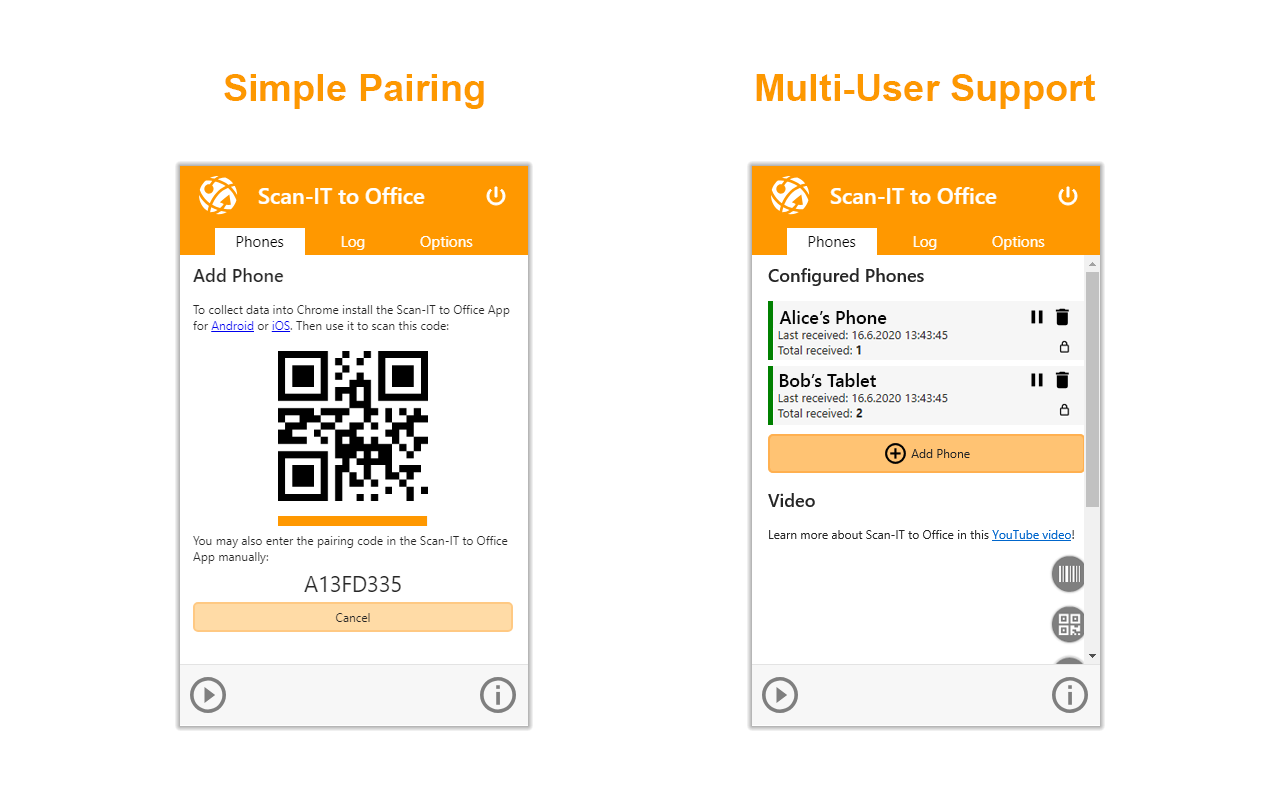
Mobile Data Collection - Scan-IT to Office Chrome extension screenshot 1
Screenshots from the Chrome Web Store listing for Mobile Data Collection - Scan-IT to Office.

Overview

Scan-IT to Office is the efficient solution for mobile data acquisition with Google Chrome. Field data collection was never that easy! This extension, assisted by the Scan-IT to Office app, provides remote data collection and barcode scanning into websites or web applications. Cloud services forward the captured data (barcodes, images, manual inputs, date and time-stamps, GPS location data) immediately into Google Chrome on your desktop computer. This works regardless of your location, even across different offices, facilities or countries. VERSATILE: Data is captured into clearly structured input forms on the smartphone or tablet. The Scan-IT to Office app provides forms which can be easily customized to your needs. For example, the use of an input form with multiple barcode fields, images or texts is a matter of seconds. EASY TO USE: Scan-IT to Office is ready to use in just a few steps: The data acquisition app is paired with the Google Chrome extension by scanning a QR code. Now the data transfer works on its own: captured bar-codes, pictures, manual inputs, timestamps or location data are automatically sent to Google Chrome on your computer. FEATURES: • Remote data collection in real time for websites and browser applications • Captures barcodes, images, dates, timestamps, texts, GPS location data and numbers • Custom and predefined data acquisition forms • Smart cloud services • Works worldwide, independent of time and place • End-to-End encryption guarantees maximum privacy & security • Single and multi-user scenarios are supported • Quick and user-friendly installation IMPORTANT NOTICE: To use this free extension, you also need the Scan-IT to Office app for your mobile device (Android / iOS). The app installs as a free demo, for unrestricted use we kindly ask you to purchase a subscription for the app. Without a subscription, the captured data will be replaced by a demo text in irregular intervals and/or a notification is displayed. Download the app using these links: • Android: https://goo.gl/vZNG7F • iOS: https://goo.gl/w3BWy8 SUPPORTED BARCODES: • Linear bar codes: Codabar*, Code-128, Code 39, Code 93, 2 of 5 interleaved, ... • 2D codes: QR Code, Data Matrix, Aztec Code, PDF 417 • GS1 DataBar (RSS-14)* • EAN and UPC barcodes (* Android only) COMPATIBILITY: Scan-IT to Office works with Google Chrome and Google Sheets on desktop computers. FURTHER TARGETS: Using the Scan-IT to Office Tools, any Windows / macOS desktop application or database accessible via ODBC is able to process captured data. Additional Add-Ins for Google Sheets, Microsoft Word and Microsoft Excel ensure seamless operation with spreadsheets and documents. Download these add-ins/tools using this link: https://www.tec-it.com/stodownload. SUPPORT: In case of questions, please contact us at support@tec-it.com (E-Mail), TECITSupport (Skype) or visit https://www.tec-it.com/sto. Terms of use and privacy: https://www.tec-it.com/download/PDF/TEC-IT_AGB_EN.pdf

Pros

    Cons

      Who should use Mobile Data Collection - Scan-IT to Office?

      Pricing

      Mobile Data Collection - Scan-IT to Office is freemium. The free tier is usable for evaluation; compare paid tiers before committing a team.

      Similar extensions

      Avira Password Manager Chrome extension logo

      Avira Password Manager

      Music & Audio
      Free

      Avira Password Manager saves, manages, and syncs all your passwords across all your devices.

      3.7562 reviews8M+
      View Extension
      Volume Master Chrome extension logo

      Volume Master

      Music & Audio
      Free

      The simplest and most reliable volume booster 🚀 Features ⭐️ Up to 600 % volume boost ⭐️ Control volume of any tab ⭐️ Voice boost -.

      4.848,800 reviews7M+
      View Extension
      Avira Browser Safety Chrome extension logo

      Avira Browser Safety

      Music & Audio
      Free

      Your surfing made private and secure

      4.13,000 reviews7M+
      View Extension
      Chrome Remote Desktop Chrome extension logo

      Chrome Remote Desktop

      Music & Audio
      Free

      Chrome Remote Desktop extension

      3.12,900 reviews37M+
      View Extension
      Adblock Plus - free ad blocker Chrome extension logo

      Adblock Plus - free ad blocker

      Music & Audio
      Freemium

      Remove ads on YouTube and everywhere else you browse.

      4.4188,000 reviews37M+
      View Extension
      Tampermonkey Chrome extension logo

      Tampermonkey

      Music & Audio
      Free

      Tampermonkey lets you install and run userscripts to customize websites, automate repetitive tasks and enhance functionality.

      4.773,000 reviews11M+
      View Extension

      Frequently asked questions

      Is Mobile Data Collection - Scan-IT to Office free?

      Mobile Data Collection - Scan-IT to Office offers paid plans.

      Is Mobile Data Collection - Scan-IT to Office safe to install?

      Mobile Data Collection - Scan-IT to Office is published by TEC-IT Datenverarbeitung GmbH. As with any extension, review the permissions it requests before installing and remove it if you stop using it.

      What are the best Mobile Data Collection - Scan-IT to Office alternatives?

      Browse the Music & Audio category for comparable options.

      Related extensions to Mobile Data Collection - Scan-IT to Office

      Picked from the Music & Audio category and the tags mobile, data, collection — jump straight to the alternatives and head-to-head pages people open next.

      Compare Mobile Data Collection - Scan-IT to Office with the obvious rivals

      Side-by-side feature tables, pricing and a clear recommendation.

      Shortlists that include this category

      Best Productivity Chrome ExtensionsThe 10 best productivity Chrome extensions in 2026, ranked with live store ratings and install counts. Includes what each is best for and the permissions to check.Best AI Chrome ExtensionsThe best AI Chrome extensions for writing, research and productivity — Monica, Merlin, ChatGPT for Google and more, ranked by usefulness.Best SEO Chrome ExtensionsThe best SEO extensions for Chrome — Ahrefs, MozBar, SEOquake and more, ranked by metrics, audits and ease of use.Best Privacy Chrome ExtensionsThe 9 privacy Chrome extensions worth installing in 2026 — ad blocking, tracker blocking and password vaults, with live store ratings and permission warnings.Best Tab Manager Chrome ExtensionsThe 7 best Chrome tab managers in 2026, compared: collapse tabs to free memory or save restorable workspaces. Live store ratings, install counts and trade-offs.Best Free Chrome Extensions12 genuinely free Chrome extensions — no trial, no locked core feature. Live store ratings and install counts, plus the permissions to check before installing.Best Password Manager Chrome ExtensionsThe best password manager extensions for Chrome in 2026 — Bitwarden, LastPass, 1Password and more, ranked by security, free tier and sync.Best Ad Blocker Chrome ExtensionsThe best ad blockers for Chrome in 2026 — uBlock Origin, Adblock Plus, AdGuard and Ghostery compared on blocking power, memory use and privacy.Best Tab Manager Chrome ExtensionsTame tab overload with the best tab manager extensions for Chrome — OneTab, Toby, Session Buddy and more, ranked by memory savings and organization.Best Screenshot Chrome ExtensionsThe best screenshot extensions for Chrome — GoFullPage, FireShot, Awesome Screenshot and more for full-page captures, annotation and recording.Best VPN Chrome ExtensionsThe best VPN extensions for Chrome — VeePN, Browsec, CyberGhost and more, ranked by speed, privacy and free tier.Best Bookmark Manager Chrome ExtensionsOrganize your links with the best bookmark manager extensions — Raindrop.io, Pocket, Google Keep and more, ranked by features.Best Note Taking Chrome ExtensionsCapture ideas fast with the best note-taking Chrome extensions — Notion, Evernote, Google Keep and Obsidian tools.Best Reading Chrome ExtensionsRead faster and cleaner with the best reading extensions — Reader View, Read Aloud, Pocket and more.Best Focus & Productivity Chrome ExtensionsBlock distractions and get more done with the best focus extensions — StayFocusd, Forest, OneTab and more.Best Screen Capture Chrome ExtensionsCapture screenshots and record your screen with the best Chrome extensions — FireShot, Screencastify and more.Best Privacy & Security Chrome ExtensionsProtect your privacy with the best Chrome extensions — ad blockers, tracker blockers and password vaults, ranked.Best Writing Chrome ExtensionsWrite better everywhere with the best writing extensions — Grammarly, LanguageTool, Text Blaze and more.Best Developer Chrome ExtensionsEssential Chrome extensions for developers — JSON tools, Markdown viewers, web scrapers and more.