

Google Keep Chrome Extension
ProductivityFree
Found a webpage, image, or quote that you want to save for later? With the Google Keep Chrome Extension, easily save the things yo.
4.08,000 reviews6M+
View Extension
Manage privacy settings, browsing data deletion, quickly access page in incognito mode, manage cookies and monitor network traffic
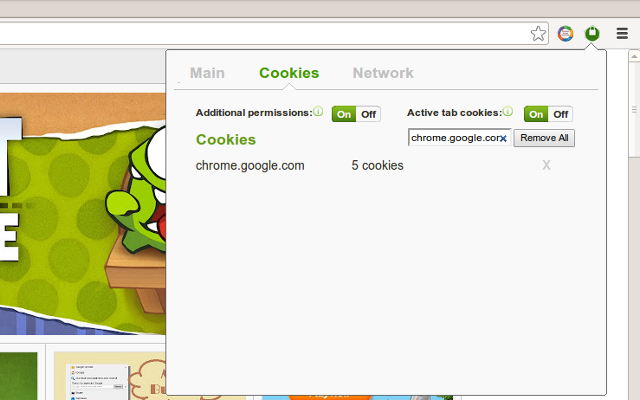
Privacy Manager is completely free and open source chrome extension for data transparency and control. Privacy Manager can help you with: * Privacy Management * Cookie Management * Browsing data deletion on browser start * Network monitoring Privacy Management - Extension provides ability to manage current privacy settings (Enable/Disable): * Blocks third-party sites from setting cookies. * Hyperlink auditing management. * Manage whether chrome must allow sending referrer headers with requests. * Show alternate error pages or not. * Automatically fill in forms settings management. * Enable or disable 'OK, Google' to start a voice search * Enable or disable password saving * Enable safe browsing in case if the option is disabled by another extension (if safe - --- - browsing is enabled Chrome does its best to protect you from phishing and malware). * Enable or disable safe browsing reporting * Search suggestion management. * Enable or disable correct spelling service. * Translate service switch. * Network prediction management. * Web RTC IP handling Browsing data deletion on browser start: * Clear websites appcaches. * Clear browser cache. * Clear browser cookies. * Clear browser download list. * Clear browser file system. * Clear browser form data. * Clear browser history. * Clear websites IndexedDB data. * Clear websites local storage data. * Server-bound certificates. * Clear stored passwords. * Clear plugins data. * Clear service workers * Clear websites WebSQL data. Cookie Management - is a tool for managing cookies (to use the tool you need to allow optional host permissions inside of the extension): * View cookies attached to domains * Filter cookies by domain * Add/create cookie * Modify cookie * Delete single cookie * Delete cookies from specific domain * Delete All cookies Network monitoring - User also can manage network traffic in popup window - collect http headers and also block user agent data to be sent via request, to use that feature you need to allow optional host permissions. Github: https://github.com/Privacy-Managers/Privacy-Manager Releases: https://github.com/Privacy-Managers/Privacy-Manager/releases Issues and feature requests: https://github.com/Privacy-Managers/Privacy-Manager#reporting-bugs-suggestions-and-questions Help me translate: https://github.com/Privacy-Managers/Privacy-Manager#translations Privacy Policy: https://github.com/Privacy-Managers/Privacy-Manager/blob/master/privacy-policy.md Contacts: Email: saroyanm@gmail.com Linkedin: http://www.linkedin.com/pub/manvel-saroyan/39/8a7/b22
Privacy Manager is free. There is no paid tier to consider.
Found a webpage, image, or quote that you want to save for later? With the Google Keep Chrome Extension, easily save the things yo.

Tampermonkey lets you install and run userscripts to customize websites, automate repetitive tasks and enhance functionality.

Chrome Remote Desktop extension

Do more in Google Chrome with Adobe Acrobat PDF tools. View, fill, comment, sign, and try convert and compress tools.

Remove ads on YouTube and everywhere else you browse.

The best way to experience 1Password in your browser. Easily sign in to sites, generate passwords, and store secure information.
Yes, Privacy Manager is free to use.
Privacy Manager is published by Privacy Manager. As with any extension, review the permissions it requests before installing and remove it if you stop using it.
Browse the Productivity category for comparable options.
Picked from the Productivity category and the tags privacy, manager — jump straight to the alternatives and head-to-head pages people open next.
Side-by-side feature tables, pricing and a clear recommendation.