Record and Metadata Comparator for Salesforce Chrome extension logo

Record and Metadata Comparator for Salesforce

Compare Record data values and object metadata in Salesforce

4.740 reviews~4K+ usersProductivityBy
Free
Updated 2026-09-01

Record and Metadata Comparator for Salesforce screenshots

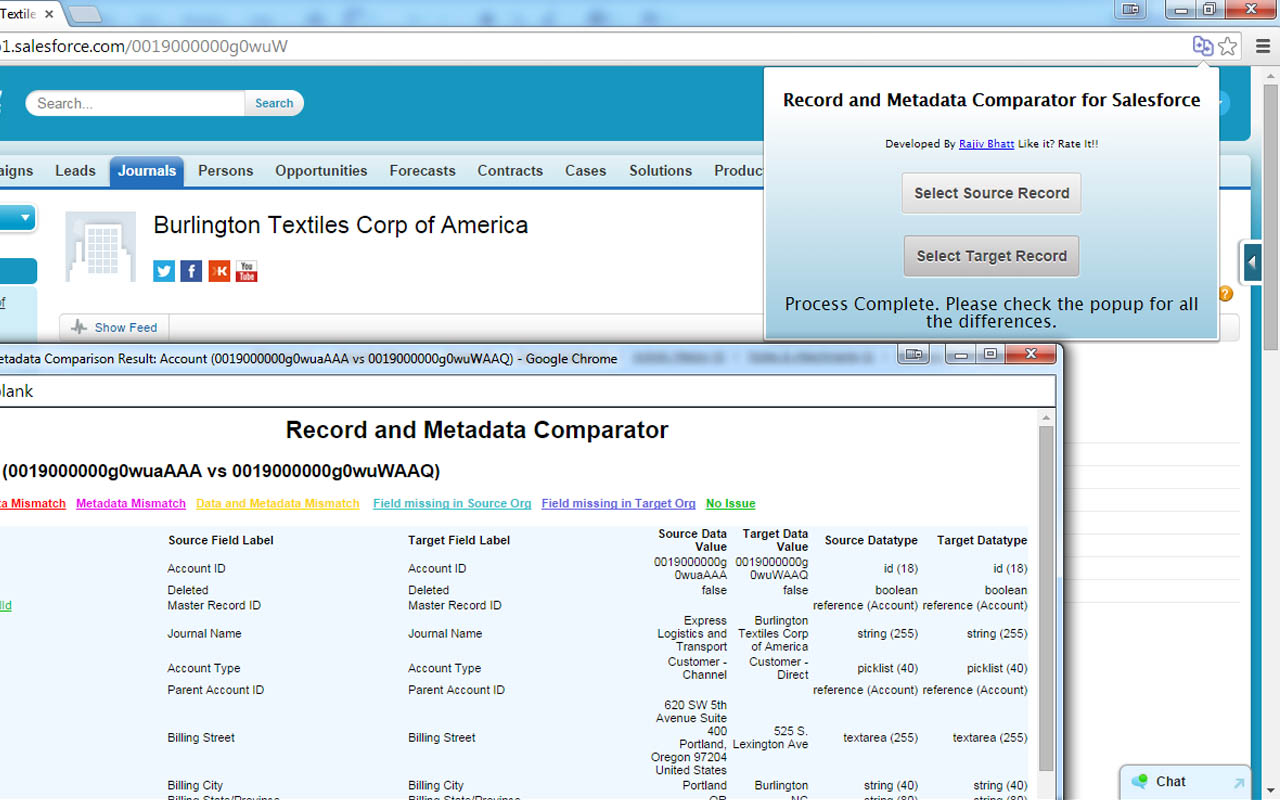
Record and Metadata Comparator for Salesforce Chrome extension screenshot 1
Screenshots from the Chrome Web Store listing for Record and Metadata Comparator for Salesforce.

Overview

Compare Object Metadata and it's record values in Salesforce (now supports Lightning!) and see all differences in just four clicks! Credits: 1. sorenkrabbe for his extension "salesforce-inspector" available @ https://chrome.google.com/webstore/detail/salesforce-inspector/aodjmnfhjibkcdimpodiifdjnnncaafh I have used the code shared by him to improvise and develop this extension. I would share the code of this extension on github soon. 2. Maninder Singh for enabling the extension to work in Lightning -https://www.linkedin.com/in/mansinghinder/ This extension compares any two objects or its records (could be from same org or different orgs) and highlights all the differences found. It can show you the following - Which fields are missing in target org. - Which fields are missing in source org - which fields have metadata difference (change in formula, datatype , required etc.) - which fields have data value mismatch Please watch the video tutorial available @ http://youtu.be/mkarbbYWveY to understand the exact functionality and its uses. Steps to compare Object Metadata: 1. Open up the custom object definition or it's list view or any of it's record in salesforce. This is your source record. Click on the extension icon and then click on the "Select Source Record" button. 2. After that, open up the custom definition of the same object or it's list view or the record (could be from same org or different org). This is your target record. Click on the extension icon and then click on the "Select Target record" button. 3. The extension would create a popup and in that show you all the differences that were found. Steps to compare Record Values: 1. open any record from a standard/custom object in one org. This is your source record. Click on the extension icon and then click on the "Select Source Record" button. 2. After that, open up any other record for the same object (could be from same org or different org). This is your target record. Click on the extension icon and then click on the "Select Target record" button. 3. The extension would create a popup and in that show you all the differences that were found. Do recommend the extension with you friends and colleagues if you like it. Also, if you like the extension, please don't forget to Rate it on the Chrome Extension Webstore. Feedback/Suggestions/Ideas/Comments most welcome. Thanks again and I hope this extension saves your time and makes you more productive! For any queries: rajivashokbhatt+metadatacomparator@gmail.com

Pros

    Cons

      Who should use Record and Metadata Comparator for Salesforce?

      Pricing

      Record and Metadata Comparator for Salesforce is free. There is no paid tier to consider.

      Similar extensions

      Google Keep Chrome Extension Chrome extension logo

      Google Keep Chrome Extension

      Productivity
      Free

      Found a webpage, image, or quote that you want to save for later? With the Google Keep Chrome Extension, easily save the things yo.

      4.08,000 reviews6M+
      View Extension
      Browsec VPN - Free VPN for Chrome Chrome extension logo

      Browsec VPN - Free VPN for Chrome

      Productivity
      Free

      Browsec VPN is a Chrome VPN extension that protects your IP from Internet threats and lets you browse privately for free.

      4.540,100 reviews8M+
      View Extension
      Adobe Acrobat: PDF edit, convert, sign tools Chrome extension logo

      Adobe Acrobat: PDF edit, convert, sign tools

      Productivity
      Freemium

      Do more in Google Chrome with Adobe Acrobat PDF tools. View, fill, comment, sign, and try convert and compress tools.

      4.462,900 reviews311M+
      View Extension
      LastPass: Free Password Manager Chrome extension logo

      LastPass: Free Password Manager

      Productivity
      Free

      LastPass is an award-winning password manager for secure credential management on any device.

      4.228,400 reviews8M+
      View Extension
      Volume Master Chrome extension logo

      Volume Master

      Productivity
      Free

      The simplest and most reliable volume booster 🚀 Features ⭐️ Up to 600 % volume boost ⭐️ Control volume of any tab ⭐️ Voice boost -.

      4.848,800 reviews7M+
      View Extension
      1Password – Password Manager Chrome extension logo

      1Password – Password Manager

      Productivity
      Freemium

      The best way to experience 1Password in your browser. Easily sign in to sites, generate passwords, and store secure information.

      2.92,800 reviews6M+
      View Extension

      Frequently asked questions

      Is Record and Metadata Comparator for Salesforce free?

      Yes, Record and Metadata Comparator for Salesforce is free to use.

      Is Record and Metadata Comparator for Salesforce safe to install?

      Record and Metadata Comparator for Salesforce is published by . As with any extension, review the permissions it requests before installing and remove it if you stop using it.

      What are the best Record and Metadata Comparator for Salesforce alternatives?

      Browse the Productivity category for comparable options.

      Related extensions to Record and Metadata Comparator for Salesforce

      Picked from the Productivity category and the tags record, metadata, comparator — jump straight to the alternatives and head-to-head pages people open next.

      Compare Record and Metadata Comparator for Salesforce with the obvious rivals

      Side-by-side feature tables, pricing and a clear recommendation.

      Shortlists that include this category

      Best Productivity Chrome ExtensionsThe 10 best productivity Chrome extensions in 2026, ranked with live store ratings and install counts. Includes what each is best for and the permissions to check.Best AI Chrome ExtensionsThe best AI Chrome extensions for writing, research and productivity — Monica, Merlin, ChatGPT for Google and more, ranked by usefulness.Best SEO Chrome ExtensionsThe best SEO extensions for Chrome — Ahrefs, MozBar, SEOquake and more, ranked by metrics, audits and ease of use.Best Privacy Chrome ExtensionsThe 9 privacy Chrome extensions worth installing in 2026 — ad blocking, tracker blocking and password vaults, with live store ratings and permission warnings.Best Tab Manager Chrome ExtensionsThe 7 best Chrome tab managers in 2026, compared: collapse tabs to free memory or save restorable workspaces. Live store ratings, install counts and trade-offs.Best Free Chrome Extensions12 genuinely free Chrome extensions — no trial, no locked core feature. Live store ratings and install counts, plus the permissions to check before installing.Best Password Manager Chrome ExtensionsThe best password manager extensions for Chrome in 2026 — Bitwarden, LastPass, 1Password and more, ranked by security, free tier and sync.Best Ad Blocker Chrome ExtensionsThe best ad blockers for Chrome in 2026 — uBlock Origin, Adblock Plus, AdGuard and Ghostery compared on blocking power, memory use and privacy.Best Tab Manager Chrome ExtensionsTame tab overload with the best tab manager extensions for Chrome — OneTab, Toby, Session Buddy and more, ranked by memory savings and organization.Best Screenshot Chrome ExtensionsThe best screenshot extensions for Chrome — GoFullPage, FireShot, Awesome Screenshot and more for full-page captures, annotation and recording.Best VPN Chrome ExtensionsThe best VPN extensions for Chrome — VeePN, Browsec, CyberGhost and more, ranked by speed, privacy and free tier.Best Bookmark Manager Chrome ExtensionsOrganize your links with the best bookmark manager extensions — Raindrop.io, Pocket, Google Keep and more, ranked by features.Best Note Taking Chrome ExtensionsCapture ideas fast with the best note-taking Chrome extensions — Notion, Evernote, Google Keep and Obsidian tools.Best Reading Chrome ExtensionsRead faster and cleaner with the best reading extensions — Reader View, Read Aloud, Pocket and more.Best Focus & Productivity Chrome ExtensionsBlock distractions and get more done with the best focus extensions — StayFocusd, Forest, OneTab and more.Best Screen Capture Chrome ExtensionsCapture screenshots and record your screen with the best Chrome extensions — FireShot, Screencastify and more.Best Privacy & Security Chrome ExtensionsProtect your privacy with the best Chrome extensions — ad blockers, tracker blockers and password vaults, ranked.Best Writing Chrome ExtensionsWrite better everywhere with the best writing extensions — Grammarly, LanguageTool, Text Blaze and more.Best Developer Chrome ExtensionsEssential Chrome extensions for developers — JSON tools, Markdown viewers, web scrapers and more.