

Adblock for Youtube™
ProductivityFree
✓ Permissions: like common ad-blocking extensions we do need default permissions on every website to remove ads or popups for exam.
4.4380,500 reviews10M+
View Extension
Stay focused and organized with URL Notes! Effortlessly take, manage, and export notes directly from any webpage, even offline.
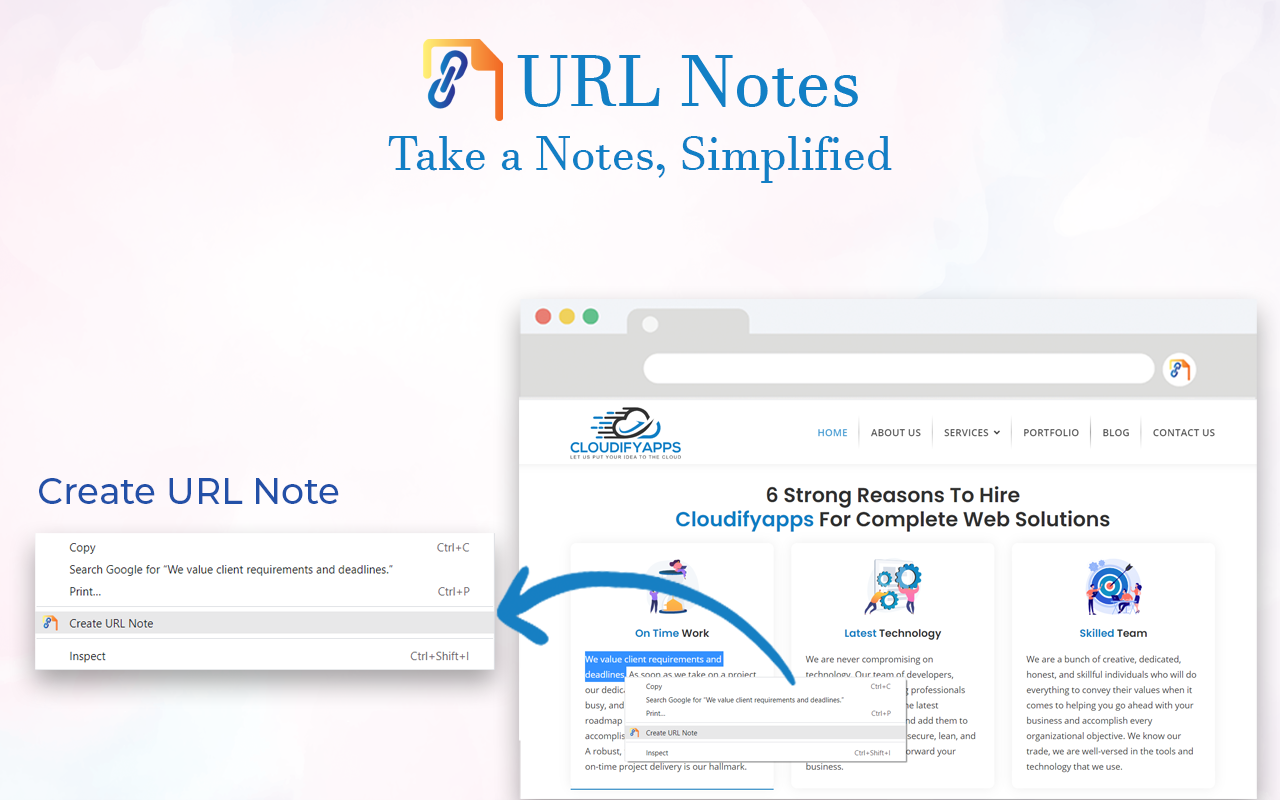
URL Notes: The Ultimate Tool to Take, Manage, and Export Notes While Browsing Stay focused and organized with URL Notes, a powerful extension designed for users who want to effortlessly take, manage, and export notes directly from any webpage. Whether you're researching, working on projects, or simply collecting important URLs, URL Notes makes note-taking a breeze. Plus, you can access and manage your notes even when you're offline! 🔑 Key Features: ✔ Take Notes Directly from Any Webpage With URL Notes, you can jot down important thoughts, reminders, and insights as you browse. No more jumping between tabs or applications—simply take notes right from your current webpage with a single click. ✔ Manage Notes with Custom Statuses Organize your notes using customizable statuses like To-Do, In Progress, and Done. This feature is perfect for project management and keeping track of where you are in your tasks. ✔ View Existing Notes on Any Webpage Easily review all your saved notes related to the webpage you're currently browsing. Keep track of your research or important details without needing to leave the page. ✔ Offline Note Access No internet? No problem. URL Notes allows you to access, manage, and even create notes offline. When you regain internet access, everything syncs back seamlessly. ✔ Export Notes to Excel Need to organize or share your notes? You can export your filtered notes to an Excel file for quick access and backup. Sort notes by text, website name, or specific statuses like To-Do or Scheduled. ✔ Backup and Restore Keep your notes safe with backup and restore options. You can back up your notes to a secure storage solution like Google Drive, Dropbox, or a local device. If anything happens, restoring your notes is just a click away. ✔ Schedule Notes for Future Reminders Stay on top of your deadlines by scheduling reminders for specific notes. This makes URL Notes an ideal tool for managing personal and work projects alike. ✔ Advanced Search Functionality Find exactly what you're looking for with advanced search filters. Search by note text, webpage name, or status, allowing you to quickly locate any note in seconds. ✔ Organized and Efficient Interface Our intuitive interface is designed to keep your notes organized and easy to access. Filter by status or search by specific keywords for maximum efficiency. 🎯 How URL Notes Improves Your Productivity: 📝 Effortless Note-Taking Quickly jot down notes without disrupting your browsing experience. 📚 Organized Research Perfect for students, researchers, and professionals who need to keep track of multiple sources. 📊 Project Management Made Simple Assign statuses to your notes and keep your workflow on track. 🌍 Work Offline Access and manage your notes anywhere, anytime, even when you're not connected to the internet. 📤 Seamless Exporting Export your notes in Excel format to share with others or to keep a backup. 🔒 Secure Backups Keep your notes safe with local and cloud backup options, ensuring your data is always protected. 👥 Who Should Use URL Notes? 🎓 Students & Researchers Track your research sources, take notes, and stay organized while studying or writing papers. 🛠 Project Managers Organize tasks and track progress with note statuses. Export notes to Excel for easy sharing with your team. 💼 Freelancers & Professionals Save important URLs, notes, and ideas in one place. Perfect for client work, reports, and brainstorming. 💡 Content Creators Collect and manage ideas for blog posts, videos, and articles while browsing for inspiration. 🚀 Why URL Notes Stands Out: 🌐 Offline Access Unlike many note-taking extensions, URL Notes allows you to continue working offline, ensuring you never lose track of your thoughts, even without an internet connection. 🗂 Customizable Workflow Organize your notes with status labels, making it easier to manage ongoing projects or research tasks. 📂 Export and Share Need to share your notes with colleagues or friends? Easily export everything to Excel for quick collaboration. 🔐 Data Privacy First All your notes are stored securely in your browser. None of your data is uploaded to any external servers, ensuring complete privacy and control over your information. ❓ Frequently Asked Questions (FAQ): 1. Can I use URL Notes offline? Yes! You can access, manage, and even create notes while offline. Once you're back online, your notes will sync automatically. 2. Is my data safe? Absolutely. Your notes are stored locally in your browser, and no data is sent to any external servers. You also have the option to back up your notes to a cloud service like Google Drive or Dropbox. 3. Can I export my notes? Yes! You can export your notes to an Excel file for easy management, sharing, or backup. 4. Can I manage multiple projects with URL Notes? Definitely. With customizable statuses like To-Do, In Progress, and Done, you can easily manage multiple tasks or projects in one place. 5. What makes URL Notes different from other note-taking extensions? URL Notes offers offline functionality, customizable statuses for better project management, and the ability to export notes to Excel—all while keeping your data private and secure. 📥 Get Started with URL Notes Today! Whether you're researching for a school project, organizing your work tasks, or simply keeping track of your favorite websites, URL Notes is the perfect tool to help you stay focused and organized. Download URL Notes now and transform the way you take notes while browsing. 🛡 Privacy Policy: We take privacy seriously. All notes are stored locally on your device and never shared with external servers. For added security, you can export your notes and store them in a location of your choosing.
URL Notes: Best Tool to Take, Manage, and Export Notes While Browsing is free. There is no paid tier to consider.
✓ Permissions: like common ad-blocking extensions we do need default permissions on every website to remove ads or popups for exam.

Found a webpage, image, or quote that you want to save for later? With the Google Keep Chrome Extension, easily save the things yo.

Chrome Remote Desktop extension

Used by 15M+ people. An easy-to-use screen recorder for your browser. Capture, edit and share videos in seconds.

The simplest and most reliable volume booster 🚀 Features ⭐️ Up to 600 % volume boost ⭐️ Control volume of any tab ⭐️ Voice boost -.

Tampermonkey lets you install and run userscripts to customize websites, automate repetitive tasks and enhance functionality.
Yes, URL Notes: Best Tool to Take, Manage, and Export Notes While Browsing is free to use.
URL Notes: Best Tool to Take, Manage, and Export Notes While Browsing is published by Cloudifyapps. As with any extension, review the permissions it requests before installing and remove it if you stop using it.
Browse the Productivity category for comparable options.
Picked from the Productivity category and the tags url, notes, best — jump straight to the alternatives and head-to-head pages people open next.
Side-by-side feature tables, pricing and a clear recommendation.