GG Auto Clicker 1.2 Chrome extension logo

GG Auto Clicker 1.2

GG Auto clicker helps you automate mouse clicks on your chrome browser and has multiple options for automation.

2.8418 reviews~40K+ usersMusic & AudioBy https://autoclicker.gg/
Free
Updated 2026-09-01

GG Auto Clicker 1.2 screenshots

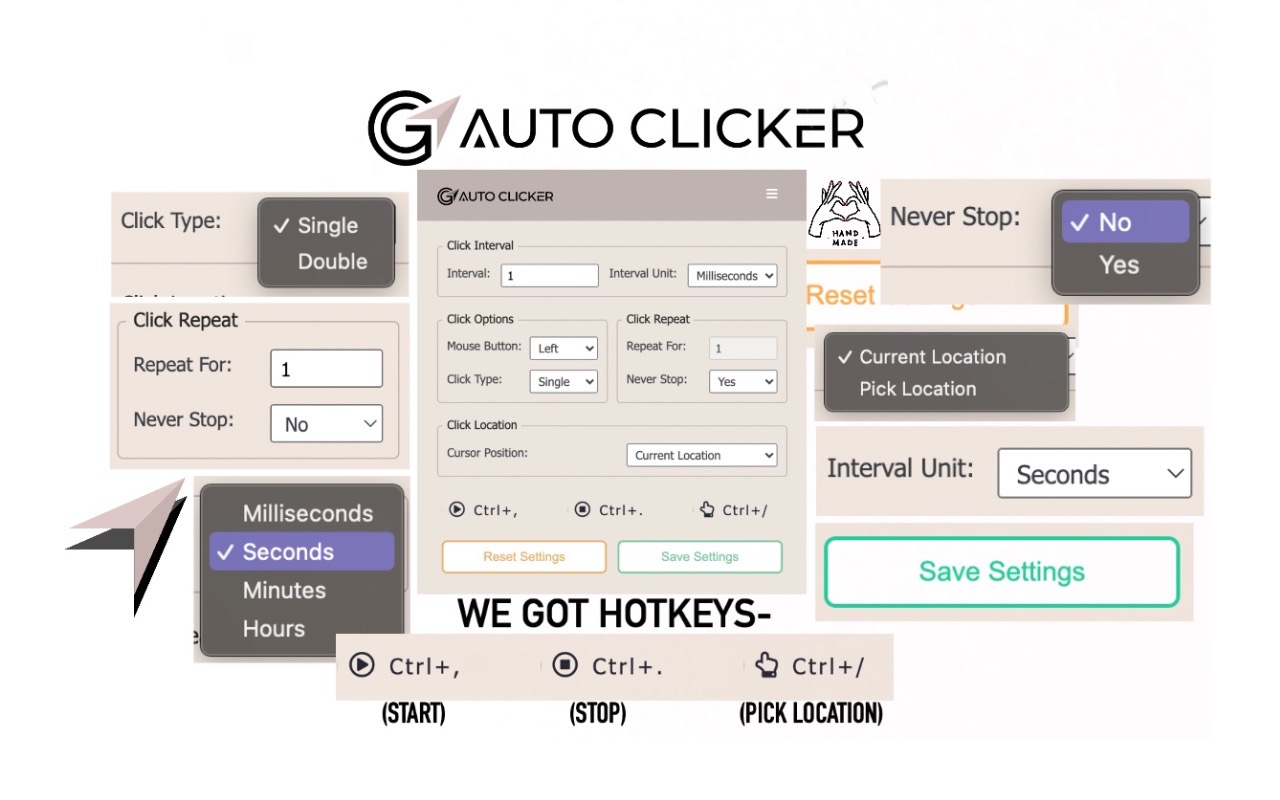
GG Auto Clicker 1.2 Chrome extension screenshot 1
Screenshots from the Chrome Web Store listing for GG Auto Clicker 1.2.

Overview

Note- ALL THE BUGS IN EXTENSION HAVE BEEN RESOLVED. IT WORKS PERFECT NOW. Hello people of the internet, we made an auto clicker for y’all that works, cherry on the top, in your chrome! ☆ GG Auto clicker chrome extension ☆ The first chrome extension with multiple clicking features to automate mouse clicks on chrome browser. NOTE - Press Ctrl and comma together to start. (Ctrl + ,). Don’t get confused! The plus symbol only means that ctrl and , should be pressed together (don’t press +) Support email - hello@autoclicker.gg (feel free to reach out for support) Allow us a moment to explain all the features to you- ✓ Click Interval: You can select the click interval between two clicks and set the unit. Example: 1 millisecond, 10 seconds or 20 minutes. ✓ Click options: You can select right or left, single or double mouse options. ✓ Click repeat: You can set the number of times it should click. Press “NEVER STOP” if you want it to run until stopped. ✓ Cursor position: You can click on current cursor location, or pick X-Y coordinates using Ctrl + / from anywhere on the screen and manually input them. ☆☆ How to operate ☆☆ ✓ Fill in your required settings. ✓ Leave the boxes that you don’t want to change, as it is. ✓ Save settings. ✓ Go back to your desired chrome window where you want to run the auto clicker online. Click on the screen once. ✓ Press Ctrl and comma buttons together to start (ctrl + ,) - please do not use the +, you only have to use two buttons simultaneously- the + is only for showing you which buttons to use together. Here are the shortcuts / commands you can use. ★ To start the auto clicker, press Ctrl + , ★ To stop, press Ctrl + . ★ To pick X-Y coordinates, press Ctrl + / THAT IS IT, SEE THE MAGIC HAPPEN. ADDITIONAL: You will find two other options at the bottom in colour- ★ Reset settings: It will reset the settings to default. ★ Save settings: It will save your current settings. (It will stay like this, unless you press reset). The chrome extension is free of cost and all the features have been thoroughly tested by our developers. But if you still find any bugs or face any issue operating, feel free to email us. ★★★ EMAIL US at hello@autoclicker.gg for any kind of support. ★★★ Please don’t drop a negative review, before reaching out to us. We will make it work for you, in most cases.

Pros

    Cons

      Who should use GG Auto Clicker 1.2?

      Pricing

      GG Auto Clicker 1.2 is free. There is no paid tier to consider.

      Similar extensions

      Dark Reader Chrome extension logo

      Dark Reader

      Music & Audio
      Free

      Generates a dark theme for every website.

      4.713,100 reviews7M+
      View Extension
      Free VPN for Chrome - VPN Proxy VeePN Chrome extension logo

      Free VPN for Chrome - VPN Proxy VeePN

      Music & Audio
      Free

      VeePN is a VPN extension that unblocks websites and secures your connection with encrypted tunneling and unlimited bandwidth.

      4.552,000 reviews14M+
      View Extension
      Browsec VPN - Free VPN for Chrome Chrome extension logo

      Browsec VPN - Free VPN for Chrome

      Music & Audio
      Free

      Browsec VPN is a Chrome VPN extension that protects your IP from Internet threats and lets you browse privately for free.

      4.540,100 reviews8M+
      View Extension
      Adblock Plus - free ad blocker Chrome extension logo

      Adblock Plus - free ad blocker

      Music & Audio
      Freemium

      Remove ads on YouTube and everywhere else you browse.

      4.4188,000 reviews37M+
      View Extension
      Tampermonkey Chrome extension logo

      Tampermonkey

      Music & Audio
      Free

      Tampermonkey lets you install and run userscripts to customize websites, automate repetitive tasks and enhance functionality.

      4.773,000 reviews11M+
      View Extension
      Zoom Chrome Extension Chrome extension logo

      Zoom Chrome Extension

      Music & Audio
      Free

      Schedule Zoom meetings directly from Google Calendar

      3.91,000 reviews7M+
      View Extension

      Frequently asked questions

      Is GG Auto Clicker 1.2 free?

      Yes, GG Auto Clicker 1.2 is free to use.

      Is GG Auto Clicker 1.2 safe to install?

      GG Auto Clicker 1.2 is published by https://autoclicker.gg/. As with any extension, review the permissions it requests before installing and remove it if you stop using it.

      What are the best GG Auto Clicker 1.2 alternatives?

      Browse the Music & Audio category for comparable options.

      Related extensions to GG Auto Clicker 1.2

      Picked from the Music & Audio category and the tags auto, clicker — jump straight to the alternatives and head-to-head pages people open next.

      Compare GG Auto Clicker 1.2 with the obvious rivals

      Side-by-side feature tables, pricing and a clear recommendation.

      Shortlists that include this category

      Best Productivity Chrome ExtensionsThe 10 best productivity Chrome extensions in 2026, ranked with live store ratings and install counts. Includes what each is best for and the permissions to check.Best AI Chrome ExtensionsThe best AI Chrome extensions for writing, research and productivity — Monica, Merlin, ChatGPT for Google and more, ranked by usefulness.Best SEO Chrome ExtensionsThe best SEO extensions for Chrome — Ahrefs, MozBar, SEOquake and more, ranked by metrics, audits and ease of use.Best Privacy Chrome ExtensionsThe 9 privacy Chrome extensions worth installing in 2026 — ad blocking, tracker blocking and password vaults, with live store ratings and permission warnings.Best Tab Manager Chrome ExtensionsThe 7 best Chrome tab managers in 2026, compared: collapse tabs to free memory or save restorable workspaces. Live store ratings, install counts and trade-offs.Best Free Chrome Extensions12 genuinely free Chrome extensions — no trial, no locked core feature. Live store ratings and install counts, plus the permissions to check before installing.Best Password Manager Chrome ExtensionsThe best password manager extensions for Chrome in 2026 — Bitwarden, LastPass, 1Password and more, ranked by security, free tier and sync.Best Ad Blocker Chrome ExtensionsThe best ad blockers for Chrome in 2026 — uBlock Origin, Adblock Plus, AdGuard and Ghostery compared on blocking power, memory use and privacy.Best Tab Manager Chrome ExtensionsTame tab overload with the best tab manager extensions for Chrome — OneTab, Toby, Session Buddy and more, ranked by memory savings and organization.Best Screenshot Chrome ExtensionsThe best screenshot extensions for Chrome — GoFullPage, FireShot, Awesome Screenshot and more for full-page captures, annotation and recording.Best VPN Chrome ExtensionsThe best VPN extensions for Chrome — VeePN, Browsec, CyberGhost and more, ranked by speed, privacy and free tier.Best Bookmark Manager Chrome ExtensionsOrganize your links with the best bookmark manager extensions — Raindrop.io, Pocket, Google Keep and more, ranked by features.Best Note Taking Chrome ExtensionsCapture ideas fast with the best note-taking Chrome extensions — Notion, Evernote, Google Keep and Obsidian tools.Best Reading Chrome ExtensionsRead faster and cleaner with the best reading extensions — Reader View, Read Aloud, Pocket and more.Best Focus & Productivity Chrome ExtensionsBlock distractions and get more done with the best focus extensions — StayFocusd, Forest, OneTab and more.Best Screen Capture Chrome ExtensionsCapture screenshots and record your screen with the best Chrome extensions — FireShot, Screencastify and more.Best Privacy & Security Chrome ExtensionsProtect your privacy with the best Chrome extensions — ad blockers, tracker blockers and password vaults, ranked.Best Writing Chrome ExtensionsWrite better everywhere with the best writing extensions — Grammarly, LanguageTool, Text Blaze and more.Best Developer Chrome ExtensionsEssential Chrome extensions for developers — JSON tools, Markdown viewers, web scrapers and more.