

Draw on Page
DesignFree
Easily draw on any website with simple drawing tools, then print the result.
3.556 reviews100K+
View Extension
Inspector is the tool which mimic display dimension between selected and hover element. It would be good for designers, QA
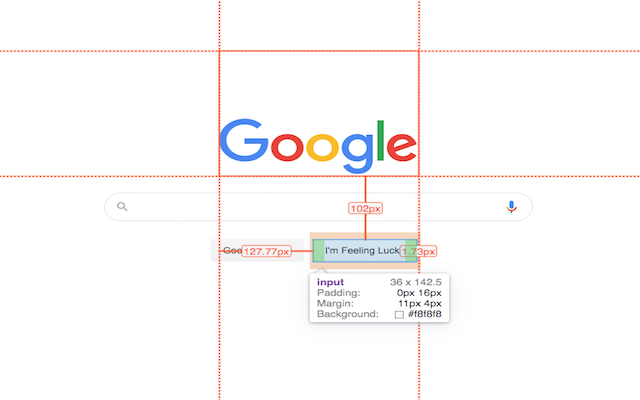
version 3.1.1 - fix bugs, - - fix esc key press behavior - - fix formation css rule - - fix popup display position - add hovered element version 3.1.0 - update UI - add new features - prepare project to new features version 3.0.2 - fix bug: prevent click(thanks Marcelo Alejandro) - add background rule permission for save setting version 3.0.1 - fix bug: extension dropped (thanks @invisioN7) version 3.0.0 - refactor core(prepare for the new features) - add sidebar (setting, more details of selected element) - add freezing selected element after 2 click - press 'space' for unfreeze selected element - add link to discord - add uninstall form - fixed calculation position of popup version 2.0.0 - used ReactJS (expected simplifying of maintain and support) - add data: padding, margin, font, color, background, line-height, class, id - fixed calculation position of popup version 1.1.0 - add highline padding(green color) and margin(orange color). - fix bugs version 1.0.5.1 - minify file for more faster loading version 1.0.5 - add top bar with styles(padding, margin, font-size, height, width) for hover and selected element - fixed bugs (when user scroll label and lines position not display correctly) - add change style for label which display height and width hovered element - change active and regular icon: - add 2 hotkeys: -- command + enter / ctrl + enter - for hide/show topbar -- esc for close extension version 1.0.4 - add functionality when start scroll - change color of labels - add dimension calculating when selected located in hovered element version 1.0.3 - add dimension calculating when hovered located outside selected element
Hover inspector like in Zeplin , Figma is free. There is no paid tier to consider.
Easily draw on any website with simple drawing tools, then print the result.

Dark mode switch any websites to dark theme. Take care of your eyes day using a classic dark reader or change screen brightness.

Create and edit images and photos with Gimp Online

Experience a beautiful image from Google Earth every time you open a new tab.

Adds background images to Google Calendar

Dark Mode: Switch to dark reading for night & day browsing. More than dark theme style, it ensures optimal eye protection.
Yes, Hover inspector like in Zeplin , Figma is free to install and use.
Browse the Design category for comparable options.
Picked from the Design category and the tags hover, inspector, like — jump straight to the alternatives and head-to-head pages people open next.
Side-by-side feature tables, pricing and a clear recommendation.