

Adblock Plus - free ad blocker
Music & AudioFreemium
Remove ads on YouTube and everywhere else you browse.
4.4188,000 reviews37M+
View Extension
Export, convert and save Gmail™ emails as a PDF document
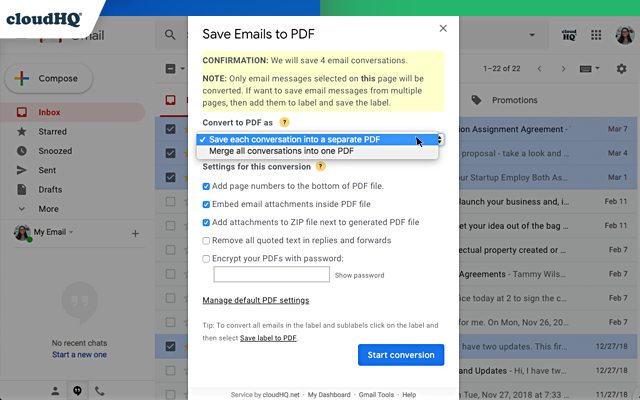
This extension lets you easily save Gmail emails and labels as a PDF document. Our service works in just 3 clicks, and you're done! With this extension you can: ✔️ Create a hard copy backup of messages for your own records ✔️ Merge multiple emails into one PDF ✔️ Backup multiple messages into separate PDFs ✔️ Save only the attachments of your Gmail messages into PDF ✔️ Great to upload your correspondence and: - Upload them into your CRM, like Salesforce, Zoho, etc. - Send it to your lawyer for legal proceedings - Send your bills, receipts, or invoices to your accountant - Send it to your human resources department for any internal issues This this extension is great for: 1. Real estate agents: 🏡Package all your Gmail messages regarding your sales transactions and upload them into SkySlope or another CRM that you're using. 2. Lawyers and legal professionals: ⚖️ Save, organize and sort all Gmail messages into one document and submit it to court. ⚖️ Convert all online conversations (sent documents, received documents, etc.) into a single file that you can then easily Clio or another CRM that you're using. 3. Project Managers and Team leads: 🚧 Archive all project communication as one document and keep it organized. 🚧 Setup an automatic saving of Gmail labels with project-related conversations to your Google Shared Drive for collaboration with your team. 4. Business owners: 💼 Get all your Gmail messages with receipts and organize them by date, customer, etc. 6. Contractors: 👩💻 Archive all communication with your clients. 7. Anybody who needs to convert, save and archive important online conversations, this is FOR YOU! 🕵️👮🏾♀️👨🎨🧑🎤👨💻🤵🏻♀️👩🔬🧕🏽🧑💼🧑🔧👩🏿🏫🧏👷 Here's everything you can do with this Convert Gmail to PDF Chrome extension: 1. You can save: - A single message or conversation - Multiple messages or conversations - An entire Gmail label - Messages and conversations matching filters - Your entire account 2. To any of these platforms: - A downloadable PDF to your local hard drive - Google Drive - Dropbox - Box - Egnyte - OneDrive 3. Feature Options you can choose to: * Include or exclude attachments * Append emails to an existing PDF document * Save your attachments only (not the body itself, but just the attachment) * Add page numbers * Condensed format (all signatures, quotations and other unnecessary data is removed) * Select an appropriate page size for printing purposes * Encrypt your file with password protection (highly encouraged for legal documents) * Forward your Gmail mails as a pdf attachment to someone else * Save your online conversation as one document with your selection * Convert and save your online conversation as a zip file with each Gmail message or conversation in separate PDF files * Convert and save your online communication one text (TXT) file * Convert and save your online communication as one HTML document * Share packages with your online conversations using secure share links We know that not one size fits all—especially when it comes to your Google e-mail, but with these flexible features, you should be covered with this extension. cloudHQ. Helping your productivity, 1 click at a time. cloudHQ website: https://www.cloudhq.net Website: https://www.save-emails-as-pdf.com Pricing: https://www.save-emails-as-pdf.com/pricing Support page: https://support.cloudhq.net/category/browser-extensions/save-emails-to-pdf/ Blog: https://blog.cloudhq.net Gmail, Google Calendar, and Google Workspace are trademarks of Google LLC. Use of these trademarks is subject to Google Permissions. cloudHQ is trademark of cloudHQ LLC. https://tsdr.uspto.gov/documentviewer?caseId=sn97775615&docId=ORC20250405001500&linkId=2#docIndex=1&page=1
Save Emails as PDF by cloudHQ is freemium. The free tier is usable for evaluation; compare paid tiers before committing a team.
Remove ads on YouTube and everywhere else you browse.

Tampermonkey lets you install and run userscripts to customize websites, automate repetitive tasks and enhance functionality.

Schedule Zoom meetings directly from Google Calendar

The best way to experience 1Password in your browser. Easily sign in to sites, generate passwords, and store secure information.

The simplest and most reliable volume booster 🚀 Features ⭐️ Up to 600 % volume boost ⭐️ Control volume of any tab ⭐️ Voice boost -.

Do more in Google Chrome with Adobe Acrobat PDF tools. View, fill, comment, sign, and try convert and compress tools.
Save Emails as PDF by cloudHQ offers paid plans.
Save Emails as PDF by cloudHQ is published by cloudHQ LLC. As with any extension, review the permissions it requests before installing and remove it if you stop using it.
Browse the Music & Audio category for comparable options.
Picked from the Music & Audio category and the tags save, emails, pdf — jump straight to the alternatives and head-to-head pages people open next.
Side-by-side feature tables, pricing and a clear recommendation.