

Adobe Acrobat: PDF edit, convert, sign tools
ProductivityFreemium
Do more in Google Chrome with Adobe Acrobat PDF tools. View, fill, comment, sign, and try convert and compress tools.
4.462,900 reviews311M+
View Extension
All-in-one Sales, Service, Help Desk & Task Manager for Gmail teams. Visual boards right in Gmail to share, assign and track emails.
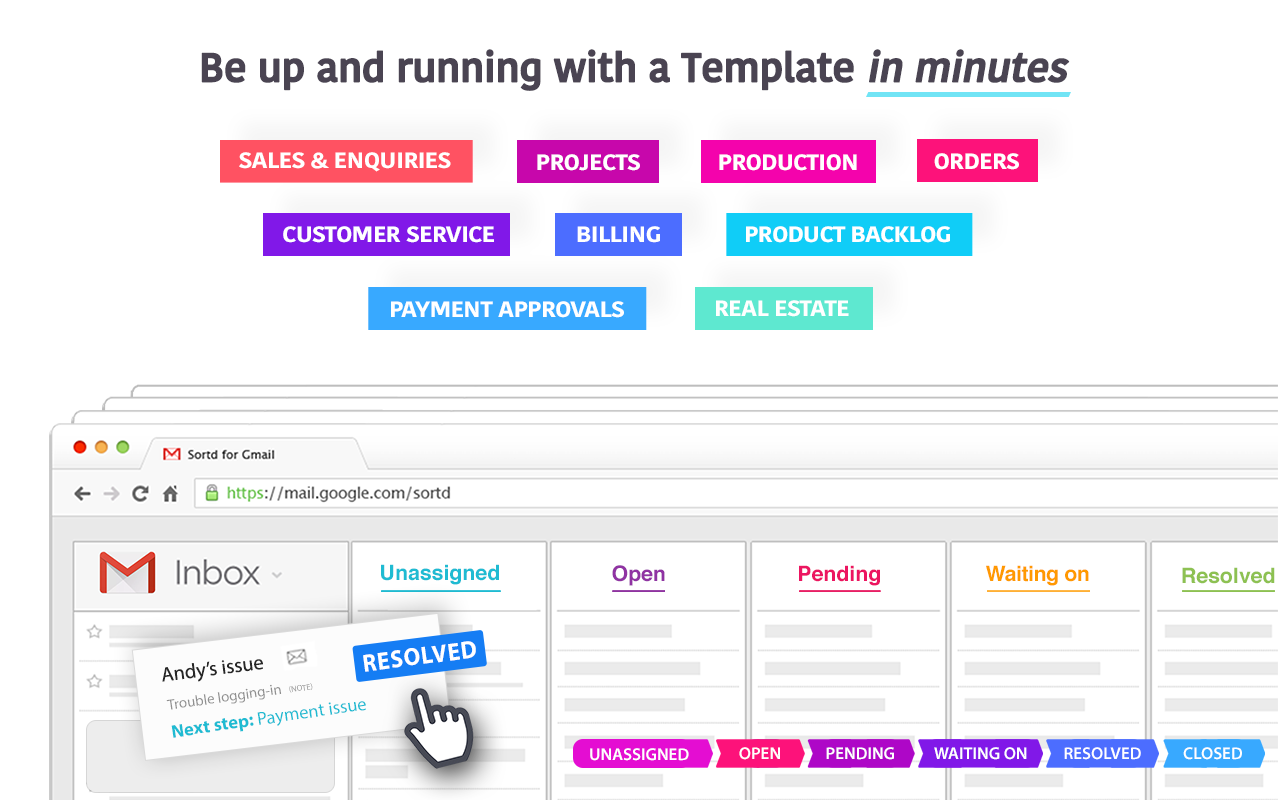
Sortd for Gmail is a is a simple, lightweight add-on for Gmail that will transform your email into organized lists to help you grow your business. Close more deals, manage projects and get more done as a team - right from Gmail! Deliver an exceptional service experience for your customers - increased efficiency, no more emails slipping through the cracks, and faster turnaround times. ➜ Drag and drop email organization ➜ Trello-style Kanban Boards ➜ Contextual team chat in email threads ➜ Email open tracking ➜ Sharing ➜ Contacts ➜ Notes ➜ Follow-up flags ➜ Reminders, and more... Organize email communication with customers, follow-ups with suppliers, and plan and manage projects - with ONE simple tool in Gmail that gives you and your entire team complete visibility over the status of work, and keeps everyone aligned. Streamline processes and manage remote work with ease. You spend your time in your email – get rid of the separate systems and hacky spreadsheets you use to keep track of work and use Sortd instead! Your entire team can now easily see who's working on what, with a transparent view of both email conversations and team tasks in the same place. Everyone now has a single version of the truth and your team can be better aligned than ever. No more looking for information in multiple systems - with Sortd everything is organized, and accessible, in an app that you are already using. Sortd is great for managing anything you do a lot of in Gmail. - Build sales relationships and manage your sales pipeline without the need for a bloated CRM. - Manage your hiring process and tracking applicants through your process. - Collaborate with your team, assign tasks and manage projects. - Deal with customer support. - Account management (delight your customers by being on top of your game). - Plan events and manage registrations. - Manage email and web form leads. Ideal for teams and businesses looking for a simple, cost effective, powerful solution for crucial functions like sales, account management and customer support - right inside Gmail. FEATURES… ➜ Transform your Gmail interface into a powerful organizer and Workflow management tool. ➜ Share email in a collaborative workspace designed for you and your team to get stuff done. ➜ Live chat for every email conversation to discuss client needs and issues with your team. In context. In real-time! ➜ Trello-style Kanban boards with customizable list names. ➜ Email open tracking to know when your emails are read. ➜ Notes for each of your contacts so you can see a history of every interaction with customers and prospective customers (notes come up every time you open any email from a particular contact). ➜ Rename the email subject - enough said. ➜ Tasks and emails in one workspace so you can plan your day the way you want to right from your email Inbox. ➜ Set follow-up reminders for both Tasks and Emails. ➜ Snooze important emails that you don’t need to deal with right away. They will come back into your Inbox at a later time for you to deal with. ➜ Deal cards can be moved through your sales pipeline. Each deal card has its own notes, reminders and activity tracking. ➜ Sales and activity reports give you a quick and understandable insights into your sales pipeline and what needs attention. ➜ Shared team contacts to build your CRM contact database as you work your deals in Gmail. Sortd adapts to the needs of any business in any industry. Get your email, tasks, projects and teamwork all Sortd! If you have any questions, please feel free to reach out to us on team@sortd.com.
Sortd for Gmail is free. There is no paid tier to consider.
Do more in Google Chrome with Adobe Acrobat PDF tools. View, fill, comment, sign, and try convert and compress tools.

VeePN is a VPN extension that unblocks websites and secures your connection with encrypted tunneling and unlimited bandwidth.

Found a webpage, image, or quote that you want to save for later? With the Google Keep Chrome Extension, easily save the things yo.

Browsec VPN is a Chrome VPN extension that protects your IP from Internet threats and lets you browse privately for free.

✓ Permissions: like common ad-blocking extensions we do need default permissions on every website to remove ads or popups for exam.

Avira Password Manager saves, manages, and syncs all your passwords across all your devices.
Yes, Sortd for Gmail is free to use.
Sortd for Gmail is published by Sortd Inc. As with any extension, review the permissions it requests before installing and remove it if you stop using it.
Browse the Productivity category for comparable options.
Picked from the Productivity category and the tags sortd, gmail — jump straight to the alternatives and head-to-head pages people open next.
Side-by-side feature tables, pricing and a clear recommendation.