

AdBlock
Privacy & SecurityFreemium
One of the most installed ad blockers for Chrome, with simple whitelisting.
4.5290,300 reviews61M+
View Extension
Find text or links as you type
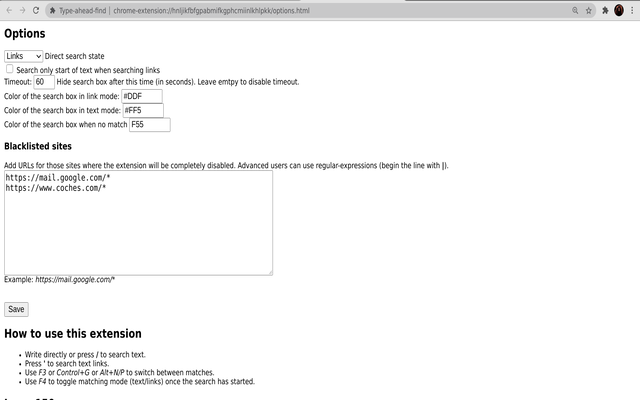
Type-ahead-find [1] is an accessibility feature to search links and text faster on a webpage. How to use it: * Start writing (or press /) to start text search. * Press ' to search only links. * Change option "direct search state" to set the default search policy (text, links or disabled). * Use (Shift+)F3 or (Shift+)Control+G or Alt+N/P to switch between matches. * Use F4 to toggle matching mode (text/links) once the search is active. * Blacklist sites that set up their own shortcuts. * The search shows first matches in current viewport. Limitations: * It cannot search inside iframes. * It does not search text in adjacent HTML nodes (i.e. "hello" won't be found in HTML <b>He</b>llo) * If the page already sets Javascript keybidings, the extension may misbehave. The best solution is to blacklist the site in the options page and disable the extension for this particular website.
Type-ahead-find is free. There is no paid tier to consider.
One of the most installed ad blockers for Chrome, with simple whitelisting.

Do more in Google Chrome with Adobe Acrobat PDF tools. View, fill, comment, sign, and try convert and compress tools.

Powering your web experience with a reliable, endpoint protection layer.

The world's most trusted crypto wallet

Block malware, scams, phishing and trackers for safer, cleaner, and ad-free browsing.

Remove ads on YouTube and everywhere else you browse.
Yes, Type-ahead-find is free to install and use.
Browse the directory category for comparable options.
Picked from the same category and the tags type, ahead, find — jump straight to the alternatives and head-to-head pages people open next.
Side-by-side feature tables, pricing and a clear recommendation.