

Free VPN for Chrome - VPN Proxy VeePN
ProductivityFree
VeePN is a VPN extension that unblocks websites and secures your connection with encrypted tunneling and unlimited bandwidth.
4.552,000 reviews14M+
View Extension
Create hotkeys for Google Docs
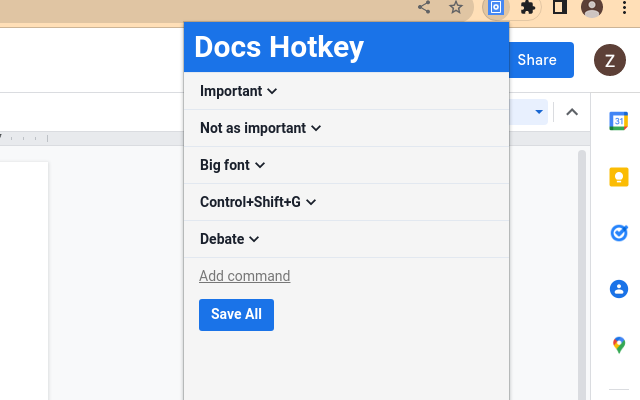
Docs Hotkey allows for complex hotkey setups with simple configuration. Hotkeys can be created to do the following: - Highlight in any color - Bold - Underline - Italicize - Change text color - Change fonts - Change font size - Set heading type (e.g., Heading 1, Normal Text, Title) - Strike through text - Change alignment and indentation - Add emoji reactions - Add bulleted lists and set their spacing - Clear all styles and remove specific styles - Execute add-ons - Insert search menu components (e.g., building blocks) A single hotkey can be configured to do several of these at once. Docs Hotkey was originally created solely for the addition of a highlight shortcut, but it has since expanded to many others. If you'd like to see a new shortcut added or if you encounter a bug, feel free to contact me. Also supports Google Slides and Google Classroom! Documentation: https://docs-hotkey.zackmurry.com
Docs Hotkey is free. There is no paid tier to consider.
VeePN is a VPN extension that unblocks websites and secures your connection with encrypted tunneling and unlimited bandwidth.

One of the most installed ad blockers for Chrome, with simple whitelisting.

Remove ads on YouTube and everywhere else you browse.

Translate selected text or a full page without leaving the tab.

Finds and applies coupon codes at checkout.

Chrome Remote Desktop extension
Yes, Docs Hotkey is free to install and use.
Browse the directory category for comparable options.
Picked from the same category and the tags docs, hotkey — jump straight to the alternatives and head-to-head pages people open next.
Side-by-side feature tables, pricing and a clear recommendation.