

Adblock Plus - free ad blocker
ProductivityFreemium
Remove ads on YouTube and everywhere else you browse.
4.4188,000 reviews37M+
View Extension
Displays interactive charts and statistics of your entire browsing history.
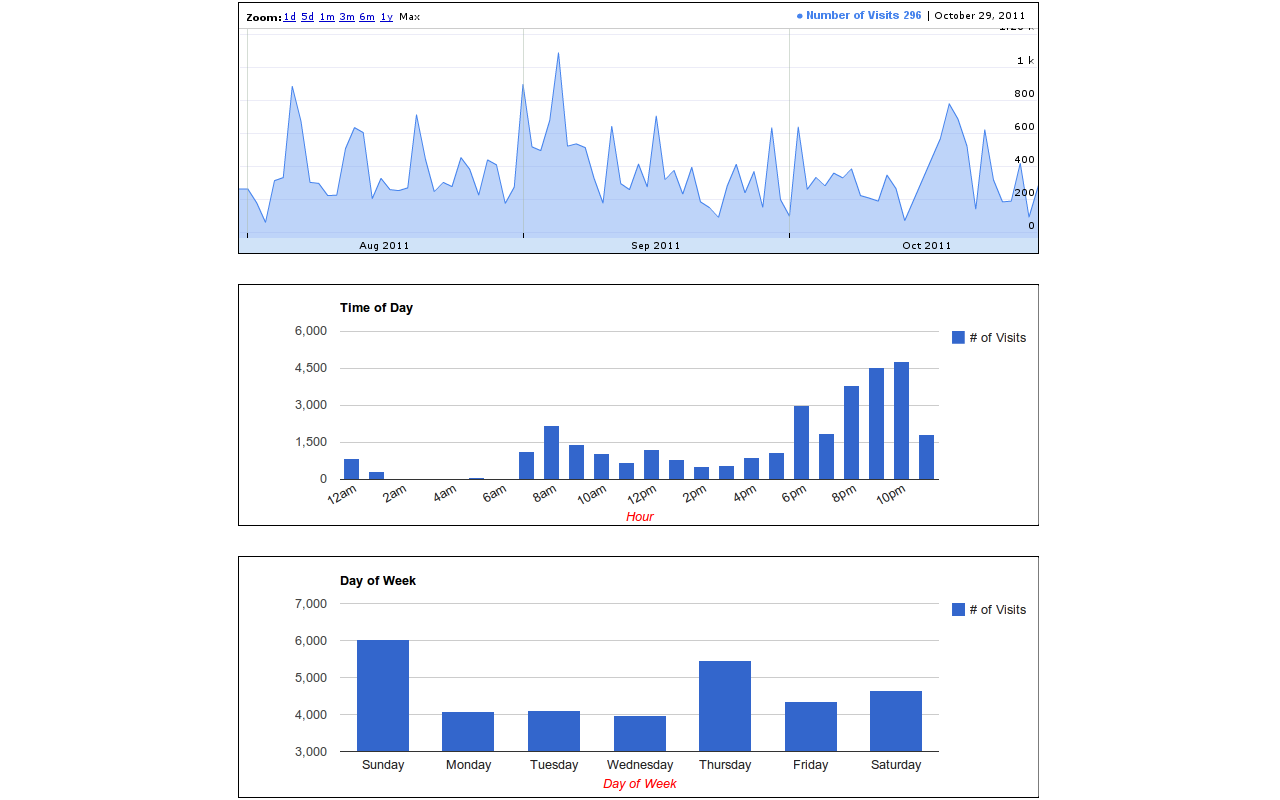
History Trends analyzes your entire browsing history and displays a variety of charts and statistics. It's interactive, too: just click a link or a chart to filter your history by different criteria. Examples: * Find your Top 10 most-used bookmarks: Click the "auto_bookmark" pie slice on the Transition Type chart. * View the Top 10 domains you've visited today: Click the "Today" link in the "Daily Stats" section. * Find out what URLs you visit at 3 in the morning: On the "Time of Day" chart, click the bar (if it exists) for 3am, then click the URLs tab. History Trends displays the following stats and charts: * Total URLs visited and total number of visits * Top 10 most visited domains * Top 10 most visited URLs * Top 10 busiest days (i.e., days with most visits) * Daily Visit stats (e.g., average and median visits per day) * Chart of visits per day as a time-series * Chart of visits by hour of day * Chart of visits by day of week * Chart of visits by day of month * Chart of visits by month * Chart of transition type (e.g., link, bookmark, reload, etc) Notes: * Please be aware that clearing your history will reset all of your stats to zero! * Chrome only allows access to the past 3 months of history. Have feedback? Email me at randy.lauen@gmail.com Recent Changes ------------------------ 1.5.5 - Upgraded to manifest v3 - Charts are now drawn with Apache eCharts - Removed Google Analytics - Fixed broken link to definition of transition types 1.5.4 - Removed the unnecessary "tabs" permission to comply with the Chrome Web Store guidelines 1.5.3 - The extension had stopped working due to a change in the Google charts URL. Updated the extension to use the new URL. 1.5.2 - CSS Changes
History Trends is free. There is no paid tier to consider.
Remove ads on YouTube and everywhere else you browse.

One of the most installed ad blockers for Chrome, with simple whitelisting.

Do more in Google Chrome with Adobe Acrobat PDF tools. View, fill, comment, sign, and try convert and compress tools.

Finds and applies coupon codes at checkout.

Efficient, open-source content and ad blocker.

Powering your web experience with a reliable, endpoint protection layer.
Yes, History Trends is free to install and use.
Browse the directory category for comparable options.
Picked from the same category and the tags history, trends — jump straight to the alternatives and head-to-head pages people open next.
Side-by-side feature tables, pricing and a clear recommendation.